
1. Introduction
Amazon Elastic Kubernetes Service (EKS) supports IAM Roles for Service Accounts (IRSA), a secure authentication mechanism that allows Kubernetes pods to access AWS services using IAM roles instead of static AWS access keys.
IRSA integrates Kubernetes ServiceAccounts with AWS IAM through an OpenID Connect (OIDC) identity provider. This enables fine-grained, workload-level permissions and ensures that applications follow the principle of least privilege.
With IRSA:
● Each Kubernetes workload can use a dedicated IAM role
● AWS credentials are provided dynamically through AWS STS
● Static credentials are not stored inside containers
● Access can be restricted at pod level instead of node level
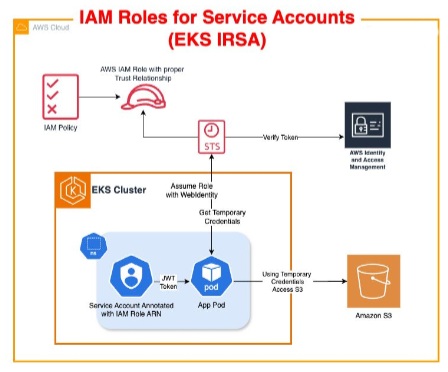
Note: IRSA is supported only in Amazon EKS because it relies on the EKS- managed OIDC integration with AWS IAM. It is not supported in local Kubernetes environments such as Minikube or Kind.
Why Use IRSA in EC2-Based EKS Clusters?
In EKS clusters running on EC2 worker nodes, pods inherit the IAM permissions attached to the worker node by default.
If the node IAM role has broad permissions, every pod running on that node gains the same access, which creates security risks.
By implementing IRSA:
- Each application receives its own IAM role
- Permissions are isolated per workload
- Unnecessary node-level access is avoided
- Security posture is significantly improved
Why Use IRSA in EKS Fargate?
In EKS Fargate, worker nodes do not exist. Therefore, there is no node IAM role that pods can inherit.
As a result, IRSA becomes mandatory for workloads that need to access AWS services such as:
- Amazon S3
- DynamoDB
- SQS
- Secrets Manager
- CloudWatch
Without IRSA, pods running on Fargate cannot authenticate to AWS services securely.
2. Prerequisites
Before configuring IRSA, ensure the following prerequisites are met:
- An active Amazon EKS cluster (EC2 or Fargate)
- kubectlconfigured for the cluster
- AWS CLI configured with appropriate permissions
- IAM permissions to create:
- OIDC providers
- IAM roles
- IAM policies
3. Configuring IRSA for Same-Account Access
Step 1: Create an OIDC Identity Provider
Open the AWS IAM Console
Navigate to Identity Providers
Select Add provider
Choose:
Provider Type:OpenID Connect (OIDC)
Enter:
Provider URL:EKS OIDC URL
Audience:amazonaws.com
Create the provider
Step 2: Create an IAM Role for the Pod
Open IAM → Roles
Select Create Role
Choose:
Trusted Entity Type:Web Identity
Select:
The OIDC provider created earlier
Audience:
amazonaws.com
Attach the required IAM permissions – S3 access
Provide a role name and create the role
Step 3: Update the IAM Role Trust Policy
Replace the default trust policy with the following configuration.
Trust Policy
{
"Version": "2012-10-17",
"Statement": [
{
"Effect": "Allow",
"Principal": {
"Federated": "arn:aws:iam::<ACCOUNT_ID>:oidc-provider/oidc.eks.us-west-2.amazonaws.com/id/<OIDC_ID>"
},
"Action": "sts:AssumeRoleWithWebIdentity",
"Condition": {
"StringEquals": {
"oidc.eks.us-west-2.amazonaws.com/id/<OIDC_ID>:aud": "sts.amazonaws.com",
"oidc.eks.us-west-2.amazonaws.com/id/<OIDC_ID>:sub": "system:serviceaccount:testing:test-sa"
}
}
}
]
}
Step 4: Create a Namespace
kubectl create namespace testingStep 5: Create a Kubernetes ServiceAccount
kubectl create serviceaccount test-sa -n testingStep 6: Verify the ServiceAccount
kubectl describe serviceaccount test-sa -n testingAt this stage, no annotations will exist.
Step 7: Annotate the ServiceAccount with the IAM Role
kubectl annotate serviceaccount test-sa -n testing eks.amazonaws.com/role-arn=arn:aws:iam::<ACCOUNT_ID>:role/pod-s3-accessStep 8: Configure the Pod to Use the ServiceAccount
Create a pod manifest:
pod.yaml
apiVersion: v1
kind: Pod
metadata:
 name: sample-pod
 namespace: testing

spec:
 serviceAccountName: test-sa

 containers:
   - name: aws-cli
     image: amazon/aws-cli
     command: ["sleep", "3600"]
Step 9: Deploy the Pod
kubectl apply -f pod.yamlStep 10: Access the Pod
kubectl exec -it sample-pod -n testing -- /bin/bashStep 11: Verify AWS Access
Run the following commands inside the pod:
aws sts get-caller-identity
aws s3 ls
If IRSA is configured correctly:
- The pod will assume the configured IAM role
- Temporary AWS credentials will be issued automatically
- AWS service access will work without static access keys
4. Cross-Account Access Using IRSA
In cross-account scenarios:
- The pod first assumes its IRSA role in the EKS account
- That IAM role then assumes another IAM role in the target AWS account using sts:AssumeRole
This enables secure access to resources located in different AWS accounts.
Approach 1: Using AWS Profiles (~/.aws/config)
You can configur role chaining inside the container.
Example Configuration
[profile cross-account]
role_arn=arn:aws:iam::<TARGET_ACCOUNT_ID>:role/<TARGET_ROLE_NAME>
source_profile = default
Advantages
- Minimal application changes
- Simple to configure
- Useful when applications already use AWS named profiles
Approach 2: Using AWS SDK AssumeRole
Applications can directly call AWS STS AssumeRole APIs programmatically.
Example Workflow
sts.assume_role(RoleArn="arn:aws:iam::<TARGET_ACCOUNT_ID>:role/<TARGET_ROLE_NAME>")Advantages
- Cleaner container images
- No dependency on AWS config files
- Better programmatic control
- Easier to automate
5. Security Best Practices
- Grant only the minimum permissions required for the workload.
- Avoid sharing ServiceAccounts across unrelated applications.
- Always restrict the subcondition to a specific namespace and ServiceAccount.
Example:
system:serviceaccount:testing:test-sa- Never store AWS access keys inside: Docker images
- Use AWS CloudTrail to audit: AssumeRole events, STS calls, AWS API activity from workloads
6. Key Benefits of IRSA
| Benefit | Description |
|---|---|
|
Secure Authentication |
Eliminates static AWS credentials |
|
Least Privilege Access |
Fine-grained IAM permissions per workload |
|
Better Isolation |
Prevents unnecessary node-level access |
|
Temporary Credentials |
Uses short-lived STS credentials |
|
Production Ready |
Supports same-account and cross-account access |
|
Improved Auditability |
IAM and CloudTrail integration |
7. Conclusion
IAM Roles for Service Accounts (IRSA) is the recommended approach for securely granting AWS access to workloads running in Amazon EKS.
By integrating Kubernetes ServiceAccounts with AWS IAM:
- Pods receive temporary credentials dynamically
- Access is controlled at workload level
- Security risks associated with node IAM roles and static credentials are eliminated
Properly implementing IRSA strengthens security, improves operational control, and enables production-grade authentication for both same-account and cross-account AWS access scenarios.