
Introduction
In many real-world DevOps environments, organizations use multiple container registries. For example:
- AWS ECR (Elastic Container Registry) for cloud-native builds
- Nexus Repository as an internal/private artifact storage
A common requirement is to move Docker images from ECR to Nexus, especially when:
- Migrating environments (UAT → DEV)
- Maintaining internal backups of images
- Centralizing artifacts inside a private network
In this guide, I’ll walk you through a step-by-step process to achieve this, along with common mistakes and best practices.
Prerequisites
Before we begin, make sure you have:
- Docker installed and running (docker ps should work)
- AWS CLI installed and configured (aws configure)
- Access to AWS ECR repository
- Access to Nexus Docker repository (e.g., docker-hosted)
- Nexus configured to allow Docker push (HTTP/HTTPS properly set)
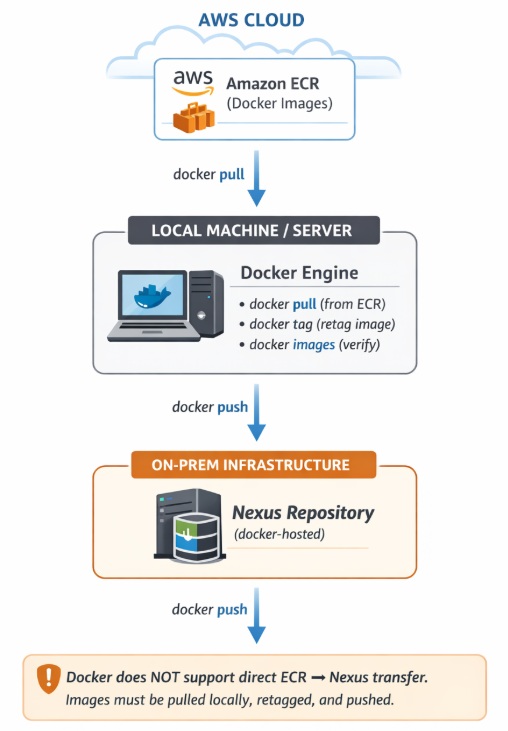
Architecture Overview
The workflow looks like this:
Step 1: Authenticate with AWS ECR
Before pulling images, you must log in to ECR.
aws ecr get-login-password --region ap-south-1 \ | docker login --username AWS --password-stdin <account_id>.dkr.ecr.ap-south-1.amazonaws.comIf successful, you will see:
Login Succeeded
Step 2: Pull Docker Image from ECR
Now pull the required image.
docker pull <ECR_IMAGE>:<TAG>After pulling, verify:
docker images
Step 3: Login to Nexus Repository
Login to your Nexus Docker registry:
docker login <nexus-ip>:<port>Step 4: Configure Insecure Registry (If Needed)
If Nexus is running on HTTP (not HTTPS), Docker needs configuration.
Edit Docker daemon config:
sudo nano /etc/docker/daemon.jsonAdd:
{ "insecure-registries": ["10.10.50.109:5000"] }Restart Docker:
sudo systemctl restart dockerStep 5: Tag the Image for Nexus
This is the most important step.
Docker cannot push directly from ECR → Nexus. You must retag the image.
docker tag <SOURCE_IMAGE> <TARGET_IMAGE>Key Rule:
- SOURCE_IMAGE= ECR image
- TARGET_IMAGE = Nexus image (clean path)
Step 6: Push Image to Nexus
Now push the image:
docker push <NEXUS_IMAGE>Step 7: Verify in Nexus
- Login to Nexus UI
- Navigate to docker-hosted
- Check your image and tag
Complete Workflow (Quick Summary)
Login to ECR
aws ecr get-login-password --region ap-south-1 \ | docker login --username AWS --password-stdin <ECR_URL>Pull image
docker pull <ECR_IMAGE>Login to Nexus
docker login <NEXUS_URL>Tag image
docker tag <ECR_IMAGE> <NEXUS_IMAGE>Push image
docker push <NEXUS_IMAGE>Pushing Docker images from AWS ECR to Nexus is a simple yet powerful workflow when done correctly. The key is understanding:
- Proper authentication
- Correct tagging format
- Avoiding common mistakes
Once mastered, this process becomes a core part of any enterprise DevOps pipeline.
Now you can confidently migrate and manage Docker images across registries!!!
Important:
Docker does not support direct ECR → Nexus transfer.
Images must be pulled, tagged, and pushed.